Blubook

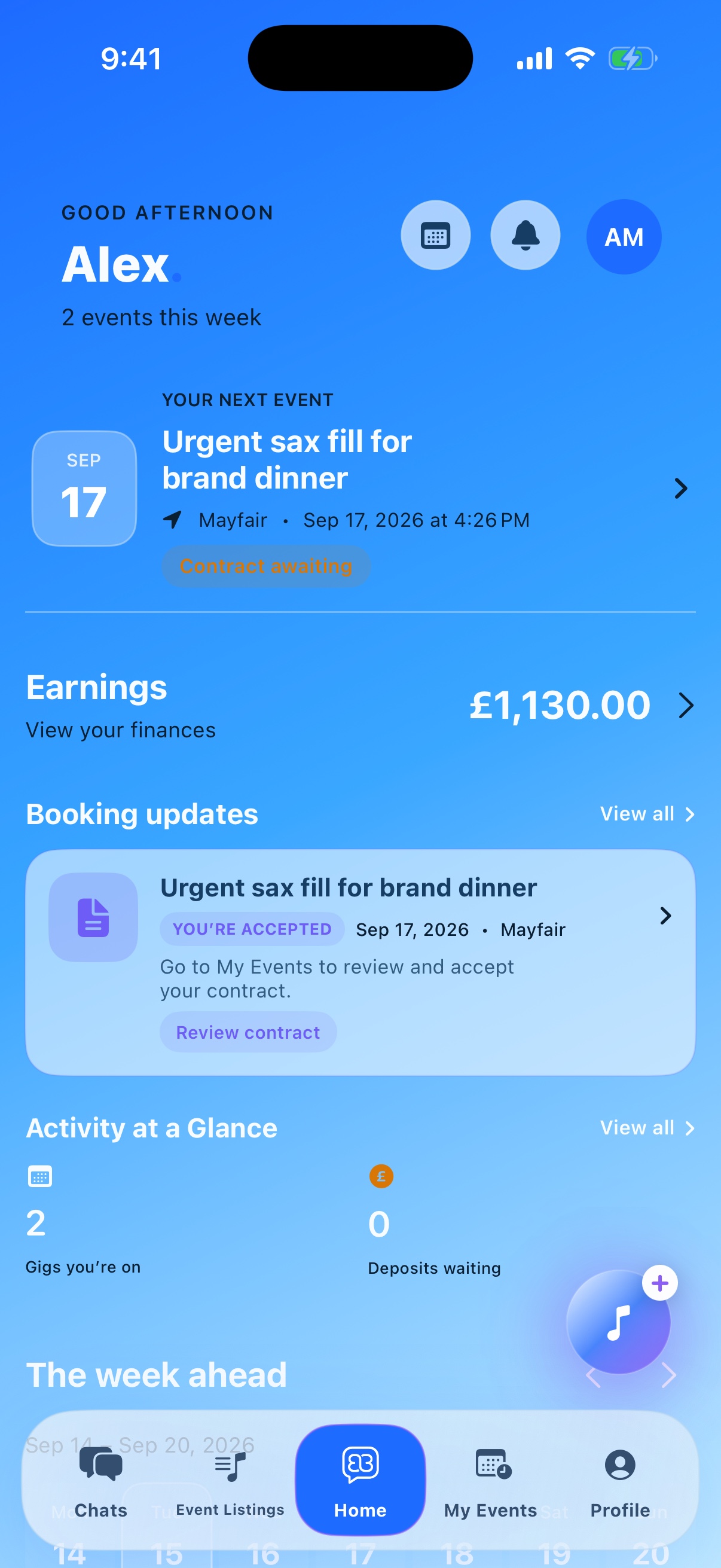
The current Blubook Beta home screen with the next event, earnings and booking updates
The last app any creative will ever need.

Why Blubook exists.

Blubook starts with creatives passing work to one another and wanting a fair way to organise the job, earn a fee for the introduction and know a reliable professional will turn up.

It brings trusted referrals, wider reach, bookings, agreements, conversations and payments into one dependable place—without messaging people individually or piecing the job together across different apps.

From the first enquiry to check-in and getting paid, the whole booking has somewhere to live.

Take a look around

Explore the app.

Choose an area, then flick through its features.

Current beta · Populated demo accounts
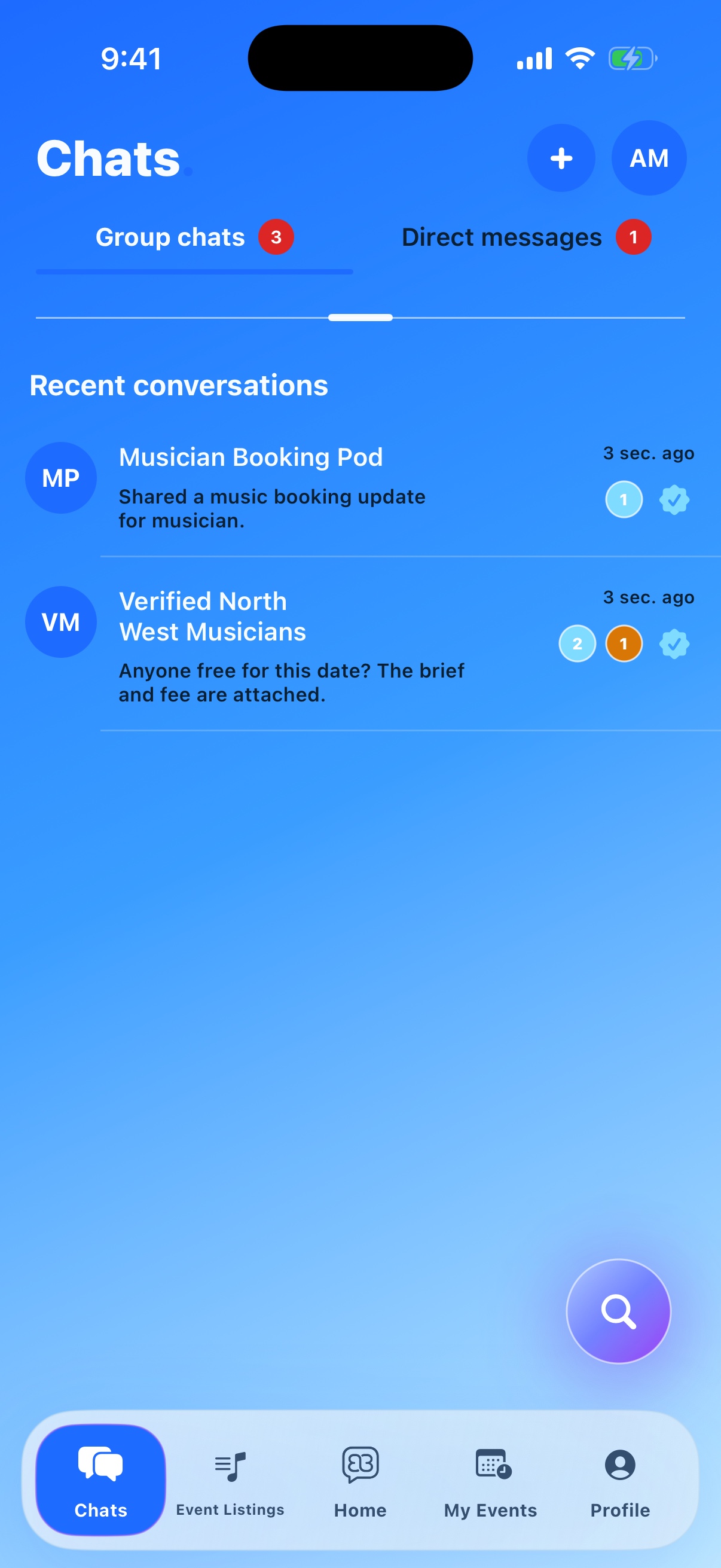
Chats · Group chats and direct messages in the current Blubook Beta
Chats · Your conversations and group requests

Inside Chats

Your conversations, together.

Open a DM, catch up with a group or keep an upcoming job together in its own Event Room.

  • DM a creative or bring your trusted people into a group.
  • Share an event, mention the right role and keep the brief close.
A little more detail

Event Rooms bring the team, pinned event and practical details together, while Networks help you meet people beyond your existing contacts.
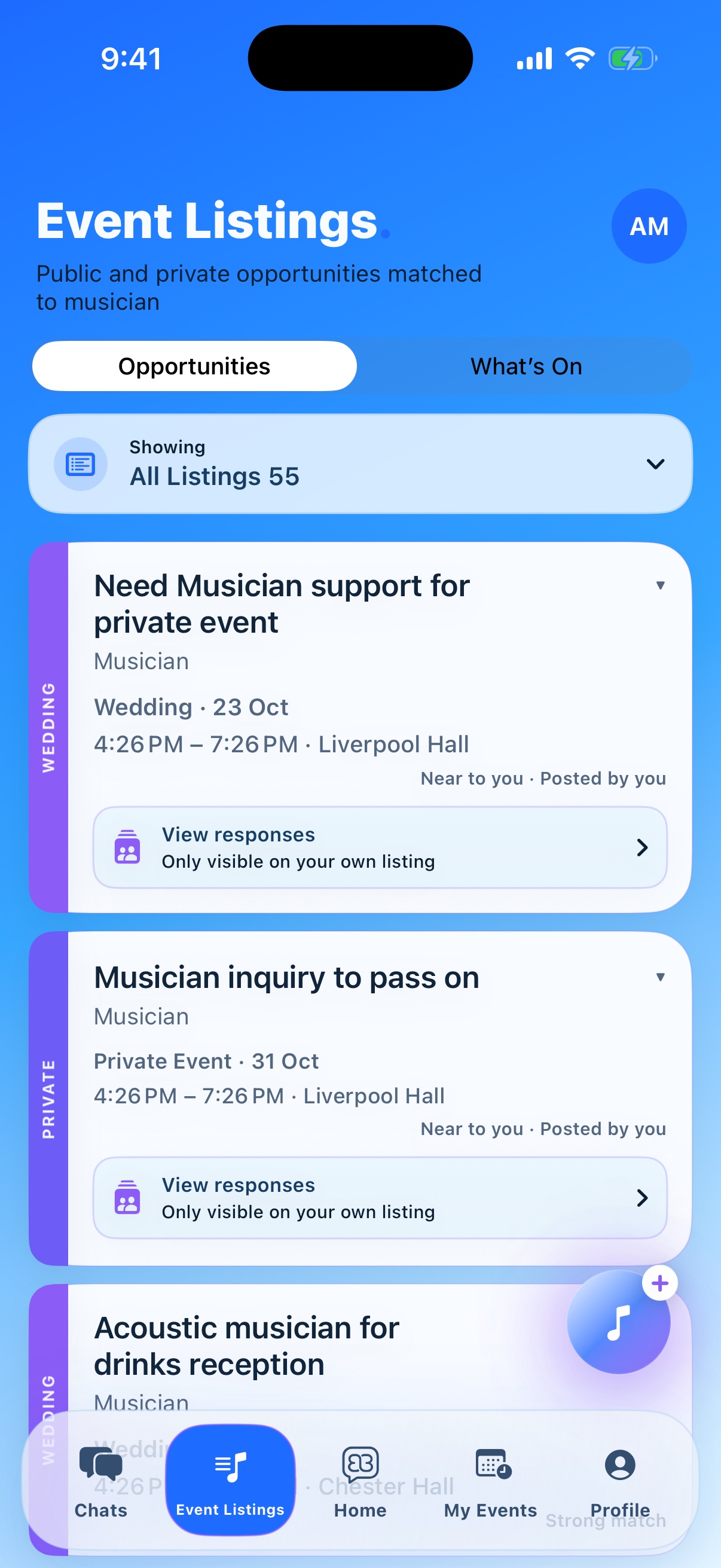
Event Listings · Matched public and private opportunities in the current Blubook Beta
Event Listings · Opportunities in the current beta

Inside Event Listings

Find a date that fits.

Browse event briefs, check the role, date, location and fee, then open the details before responding.

  • Read the role, location, date and fee.
  • Put yourself forward and discuss the details before accepting.
A little more detail

A response shows interest. The booking is confirmed through the agreement and payment process, not simply by responding.

Home · Next event, earnings and booking updates
Home · Your next event, earnings and booking updates

Inside Home

Your working week, at a glance.

See the next event, earnings, booking updates and weekly activity from one clear home screen.

  • See the next event and the booking action it needs.
  • Open earnings, updates or a new post without leaving Home.
A little more detail

The overview keeps the week readable, while the create button gives you a direct route to post work, promote an event or request urgent cover.

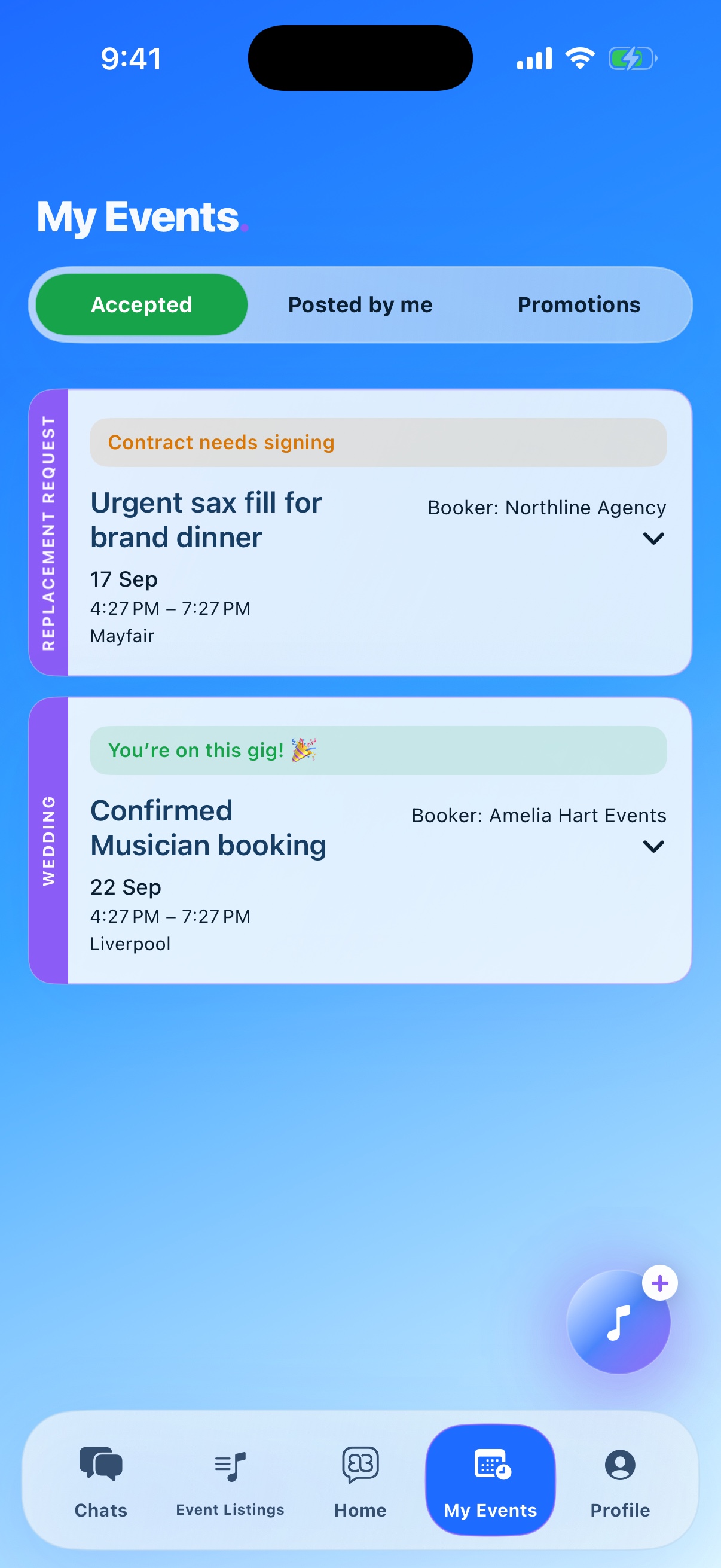
My Events · Accepted bookings and contract status in the current Blubook Beta
My Events · Accepted bookings and the next action

Inside My Events

Every booking shows what comes next.

Switch between accepted work, events you posted and promotions, with the current status visible on every card.

  • Open the next agreement or booking action from the event.
  • Keep verified arrival, payment and event status together.
A little more detail

Agree the brief and fees, select the creative, then record the creative’s signed professional agreement and the client’s signed client agreement. Both stay attached to the booking.

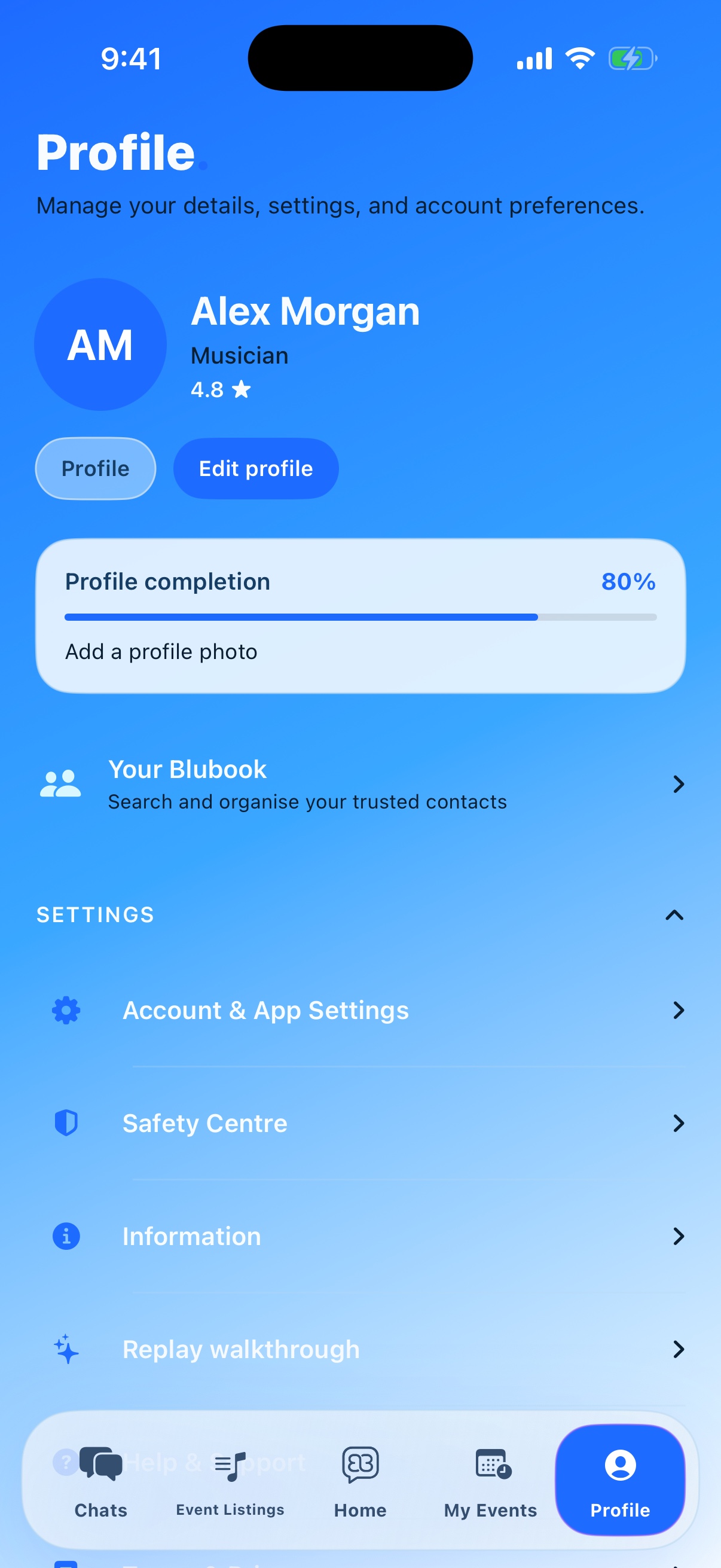
Profile · Account, trusted contacts, safety and settings in the current Blubook Beta
Profile · Your details, trusted contacts and settings

Inside Profile

Keep your working profile current.

Preview what people see, update your professional details and reach your contacts, safety tools and account controls.

  • Open your public profile, edit your details or manage Your Blubook.
  • Reach safety, support and settings from one place.
A little more detail

Your Blubook is your trusted circle of creative contacts. Connect with people you’ve worked with and want to work with again.

Our most impressive features.

01 / 08

Need Help Now

Urgent cover without messaging everyone one by one.

Send one request to relevant creatives. They can respond in moments, and you can compare the people who are available without working through your contacts individually.

02 / 08

Verified Arrival

Know they got there on time.

A one-time location check or venue PIN confirms arrival during the agreed window. It is a simple check-in—not live tracking.

03 / 08

Event Rooms

One temporary room for the whole job.

Keep the team, pinned event, arrival notes and last-minute changes together. Mention the right role and find practical details nearby, then the room expires after the work is done.

04 / 08

Discovery

Find trusted creatives outside your usual circle.

Browse by creative industry, then narrow people by profession, skill or location. Check mutual connections, portfolios, client reviews and vouches before getting in touch.

05 / 08

Availability

See who is free before you start asking around.

Check availability privately across the right role, date and location, so you spend time speaking to people who can actually take the job.

06 / 08

Recommendations

Put the right person forward for the job.

Recommend a trusted contact directly into an open opportunity. The organiser gets a warm introduction and the creative gets the full brief.

07 / 08

Agreements

Keep the brief, fees and signatures together.

The professional and client can review and sign their agreements inside the booking, alongside the event details, fees and any changes.

08 / 08

Payments & Payouts

Collect once and pay everyone correctly.

The client pays through a secure booking link. Funds stay with the event until release, then the creative’s fee and any agreed booker’s fee go to the right payout accounts—without chasing transfers.

Need Help Now · 1 of 8

From the first enquiry to everyone paid

One booking.
Every step—and every share—taken care of.

Follow the job through Blubook. If you introduce the creative, your agreed booker’s fee stays with the booking and is paid alongside their fee when the funds are released.

Enquiry

The opportunity starts here.

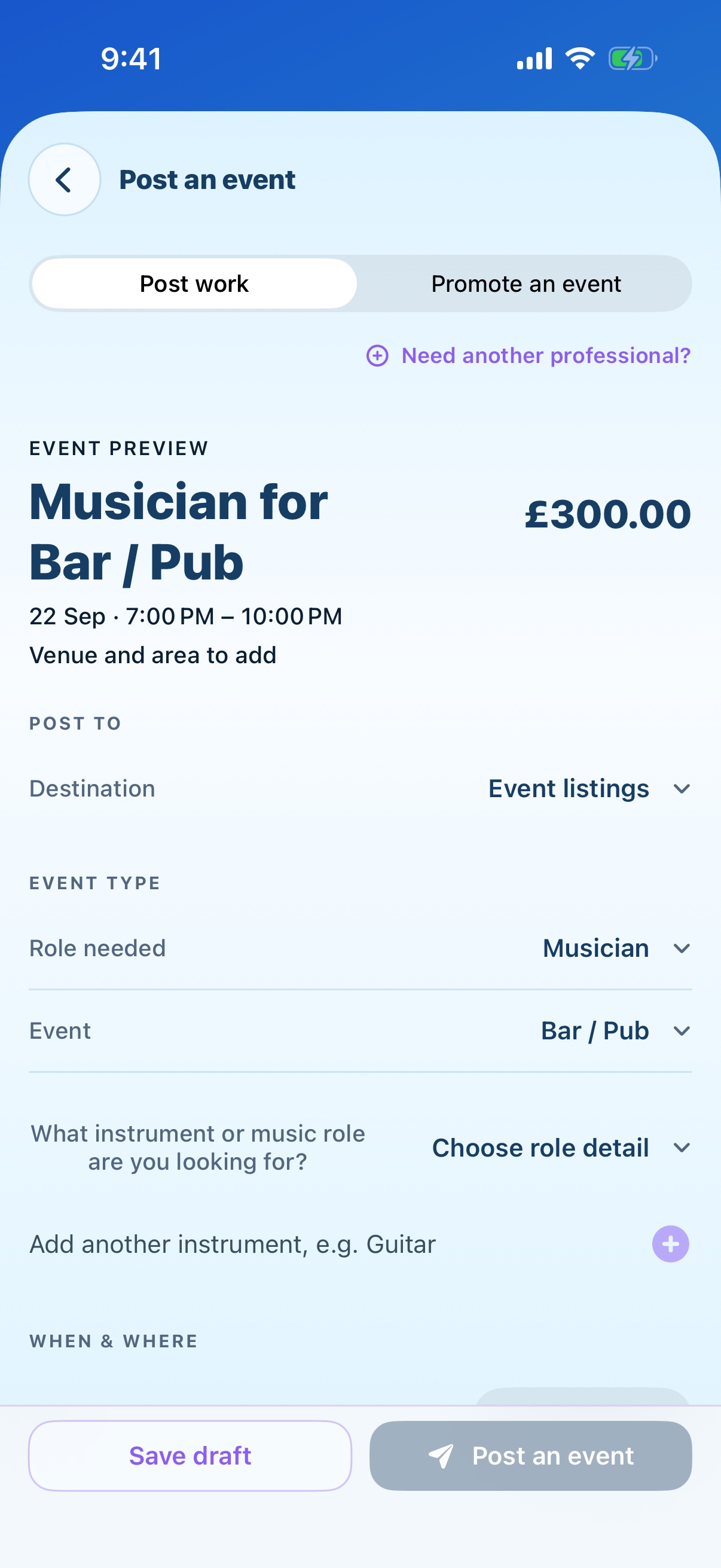
Add the brief, role, date and fee. Share the job and see who can take it.

Post an event form with destination, role, event type, date, location and fee
Create an event · The details behind the enquiry

Signed booking

Everyone agrees the job.

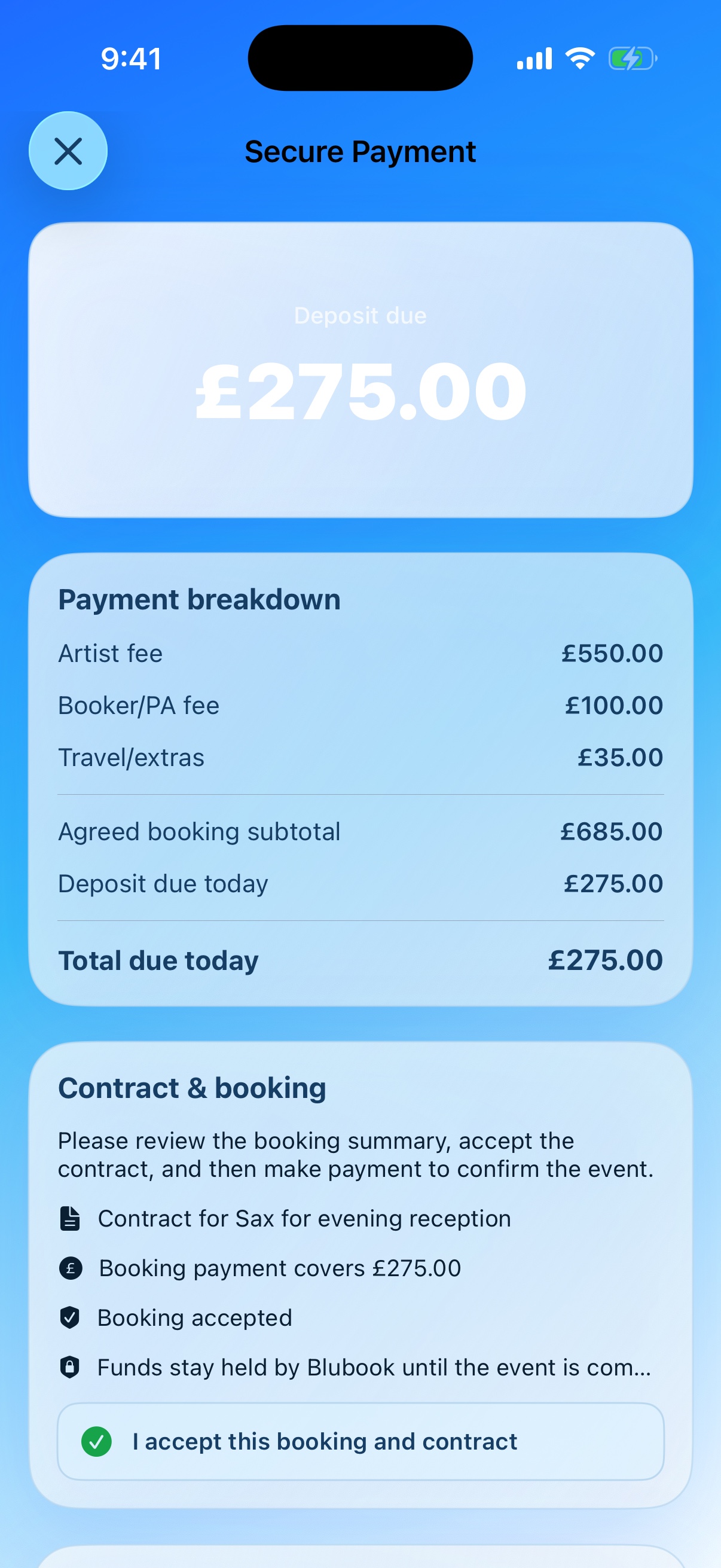
Confirm the creative, record both agreed fees, and keep the professional and client agreements inside the booking.

Secure payment screen with the booking breakdown and agreement confirmation
Secure payment · The booking, agreement and amount together

Deposit held

The date is secured. The deposit is held.

The client pays the deposit. It belongs to the booking and is not an available payout.

✓ Deposit received Held for the booking

Not available for payout

Illustrated payment status

Fully paid

Paid before the event. Still held.

The remaining balance is paid before the event, so the booking is fully funded. It stays held until the release point.

✓ Paid in full Held until release

Not available for payout

Illustrated payment status

Released

Two days later, everyone gets their share.

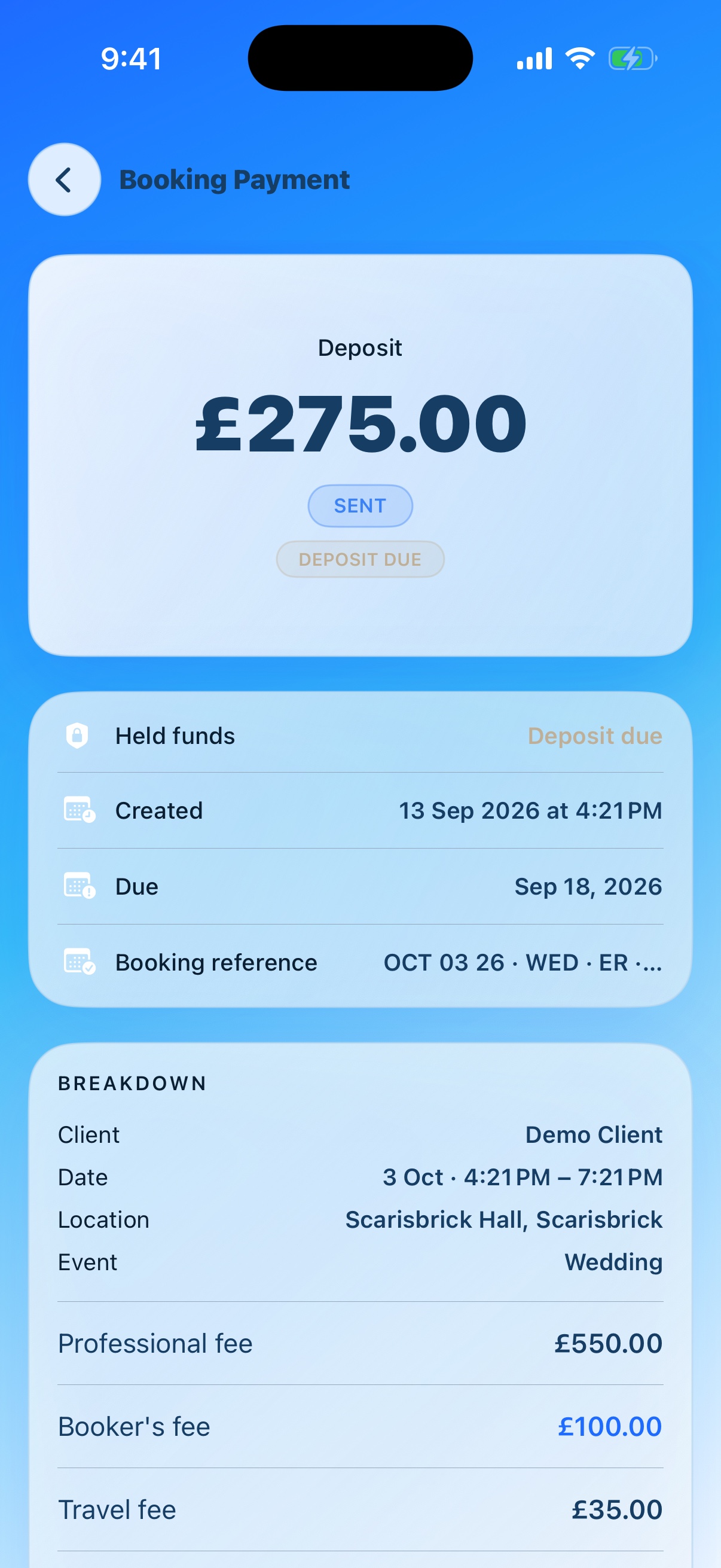
Two days after the event, funds are distributed to the creative and booker unless the client raises a dispute. Released funds are available for payout.

Booking payment screen showing the deposit, held funds and fee breakdown
Booking payment · Held funds and fee breakdown
What if the client cancels?

If the client cancels, the deposit goes to the artist under the booking’s cancellation terms. Those terms are agreed in the contract, so everyone knows what the deposit covers.

When can I withdraw the money?

Funds are held and are not an available payout until two days after the event. Then the agreed shares are distributed. If the client raises a dispute, distribution is paused and the funds stay held while it is resolved.

When does the client pay?

The balance is due four weeks before the event. Bookings made within six weeks require full payment when booking. The whole booking is paid before the event; funds must be received before they can be released.

Held funds are not available for payout. Distribution happens two days after the event, unless the client raises a dispute.

Different work. The same connected idea.

Where do you fit in?

Choose your creative world to see how Blubook could help on a real job.

Musicians, DJs, singers and bands

Already booked for that date?

You’re already booked when another wedding enquiry comes in. Share the brief with trusted musicians, find someone who can cover it and agree a fee for arranging the booking. The client gets a performer, and the opportunity stays in your circle.

See how passing on work can pay ↗

Dancers and choreographers

One show. Everyone in step.

You’re bringing dancers together for a live performance. Use a group chat to check who can make the dates and share rehearsal details. When show day arrives, keep call times, the meeting point and last-minute updates in the event’s timed chat.

Explore group and event-day chats ↗

Actors, comedians and presenters

Find the role that fits you.

A venue needs a host for an upcoming event. Read the brief, date, location and fee in Event Listings before putting yourself forward. Your profile brings your specialties, showreel and feedback together so the organiser can get to know your work.

Explore Event Listings ↗

Photographers, videographers and content creators

A bigger shoot needs a bigger team.

You’ve been asked to cover both photography and video for a launch. Find a collaborator in your Blubook, share the brief and agree who is doing what. Keep the team’s conversation together and each person’s booking details clear.

Explore your Blubook ↗

Designers, producers and other creative professionals

New city. New creative circle.

You’re building connections somewhere new. Explore Networks, join relevant conversations and discover people whose work complements yours. Save the people you connect with in your Blubook, ready for the next project.

Explore Networks and connections ↗
Can I meet people outside my existing network?

Yes. Explore Networks for creative communities, recommendations and conversations beyond your current contacts.

Can I download Blubook yet?

The iPhone, Android, Mac and Windows apps are coming soon. Download links will be added when they’re ready.

Blubook is coming soon

Keep good work
in good company.

For the jobs you take, the ones you pass on,
and the people you make them happen with.

iPhone · Coming soon Android · Coming soon Mac & Windows preview